¶ INFINITYS Documentation Portal
The reference point for documentation on INFINITYS!

¶ Introduction
In this virtual manual, you can find all the useful information to understand the system and make the best use of it.
ANIMA INFINITYS is a web app accessible from any browser. ACS recommends using Google Chrome or Microsoft Edge.
The platform structure consists of a sidebar containing the menu list and a page displaying information based on the selected sidebar menu.
This manual also features a sidebar menu that allows navigation through the pages related to the various sections of INFINITYS.
The manual pages are organized into sections:
-
INFO Section: General overview of the page, with an explanation of its main functionalities and purposes.
-
USAGE Section: Detailed description of the operations that can be performed on the page, including explanations of fundamental steps.
-
QUICK TIPS Section: A collection of tips and shortcuts, if any, to optimize the use of the page and its functionalities.
-
FAQ Section: A collection of frequently asked questions regarding the page, along with our answers and explanations, if applicable.
¶ Contacts
If you need support, wish to report an issue, or have new requests, please contact the following email address: support.ds@acs.it
This will connect you with the support team for ACS's Digital Signage INFINITYS. You will be contacted as soon as possible.
To facilitate the support process, we recommend clearly stating:
- The anomaly encountered;
Examples:
- The display DISPLAY NAME does not turn on. It is supposed to turn on at 7:00 AM but is instead turning on at 8:00 AM.
- The media MEDIA NAME does not appear on the screen of the device DEVICE NAME.
- The device or section of ANIMA experiencing the issue;
Examples:
- The display DISPLAY NAME with serial number 1234567890, located at LOCATION/CITY.
- The media MEDIA NAME.
- The channel CHANNEL NAME.
- The company you belong to;;
- Contact details and the time frames during which we can reach you.
Examples:
- You can reach me at the following number PHONE NUMBER or email address between ... and ....
The issue can also be reported directly from the control panel via the "Help & Support" button, always located in the top right corner of the screen, marked by an icon with a question mark:
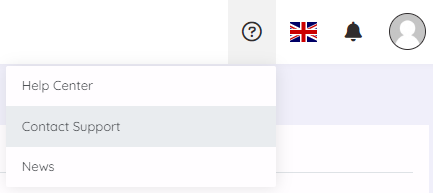
By selecting this option, the system will display the following pop-up:
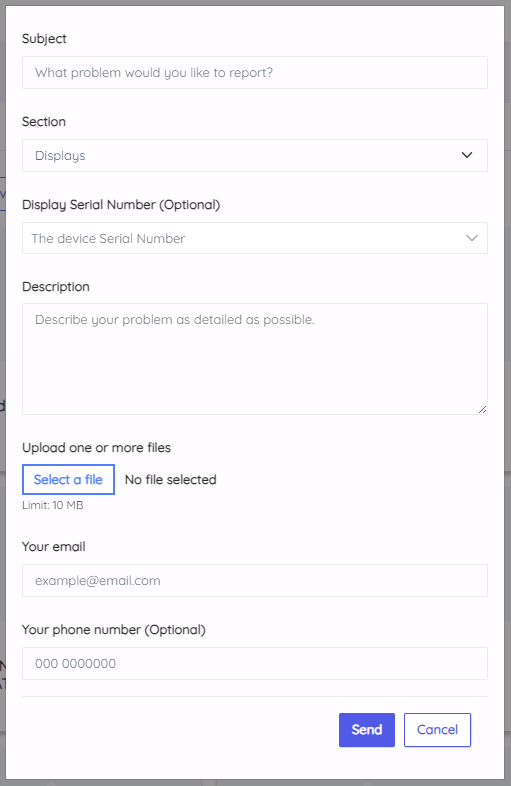
With this, you can provide detailed information about the problem.